지금까지 폼 요소를 활용하는 방법을 알아봤고 더 나아가 준비한 J.S_DOM 의 과정이 끝이났다.
다음 파트부터는 프로젝트를 진행 할 예정이지만 해당 폼요소를 활용한 예제를 고민 고민 하다가 해당 요소들을 활용하는 회원가입창을 만들어보려고 한다.
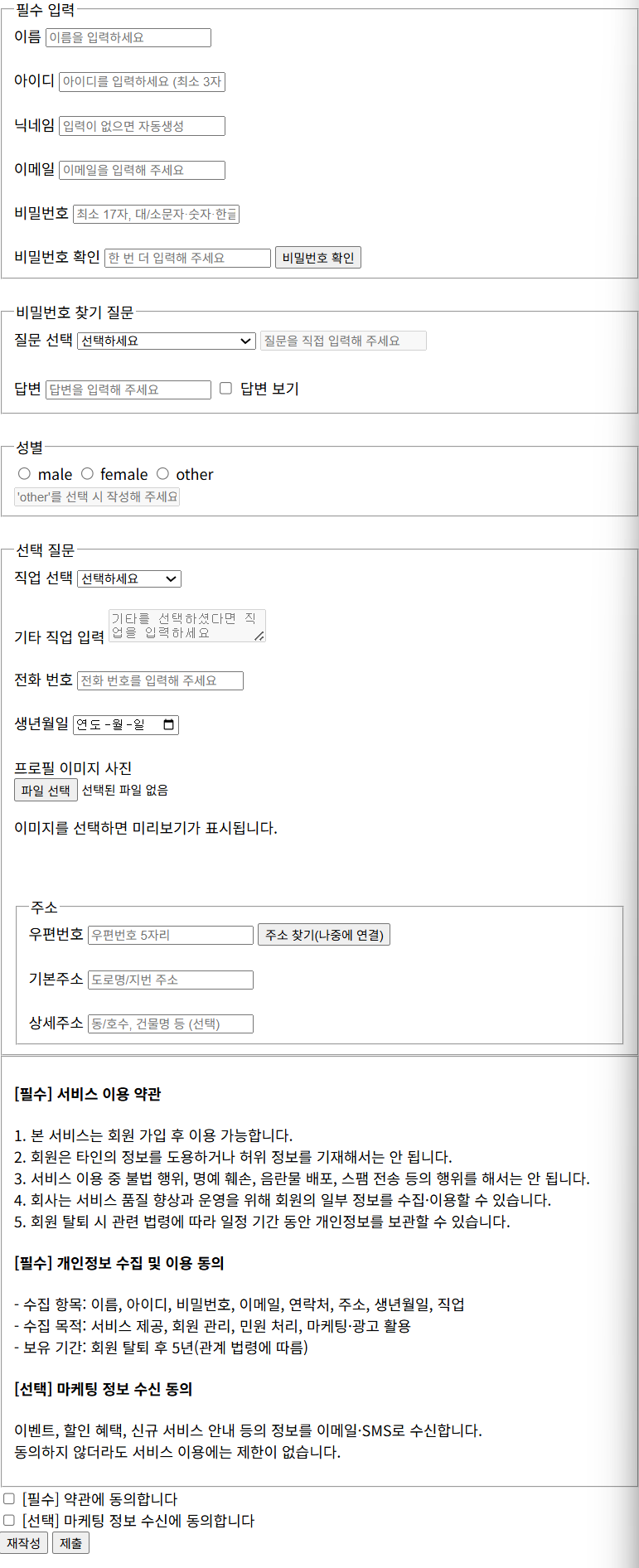
8-1.1 회원 가입폼에는 어떠한 입력 항목들이 필요할까?
| 입력 항목 | 설명 및 비고 | 사용 예정 폼 요소 |
| 이름* | 사용자의 이름 ( 필수 입력 ) | <input type="text"> |
| 아이디* | 로그인할 때 쓸 고유 아이디 ( 중복 확인 가능 ) | <input type="text"> |
| 닉네임 | 사이트 내 표시용 (미지정시 자동생성 형용사+명사) | <input type="text"> |
| 이메일* | 연락 가능한 이메일 주소 ( 이메일 형식 검사 필요 ) | <input type="email"> |
| 비밀번호* | 로그인용 비밀번호 ( 보안 위해 최소 길이 등 조건 필요 ) | <input type="password"> |
| 비밀번호 확인* | 비밀번호 재입력 ( 정확히 일치하는지 확인 ) | <input type="password"> |
| 성별* | 남성/여성/기타 선택 ( 단일 선택 ) | <input type="radio"> |
| 생년월일 | 사용자의 출생일 ( 선택 사항 ) | <input type="date"> |
| 직업 | 직업선택(사전 정의된 목록제공) | <select> |
| 연락처 | 휴대폰 또는 전화번호 ( 선택 사항 ) | <input type="tel"> |
| 프로필 사진 업로드 | 사진 파일 업로드 ( 이미지 파일만 & 선택사항 ) | <input type="file" accept="image/*"> |
| 주소 | 시/도, 구/군, 상세 주소 (카카오 API사용) | <input type="text"> (여러 개) |
| 약관 동의 | 이용 약관에 동의 여부 (필수 체크) | <input type="checkbox"> |
| 비밀 번호 찾기 질문 | 비밀번호 분실 시 본인 확인용 질문과 답변 | <select> + <input type="text"> |
자 그럼 이제 생성해보자
CSS는 무시하고 일단 HTML 을 사용하여 프론트엔드만 개발해보도록 하자
<!DOCTYPE html>
<html lang="ko">
<head>
<meta charset="UTF-8" />
<title>회원 가입창</title>
</head>
<body>
<!-- 폼 전체: novalidate는 브라우저 기본 검증을 끄는 옵션입니다.
지금은 기본 검증을 사용하려 하므로 제거해도 됩니다. 필요 시 JS로 reportValidity를 호출하세요. -->
<form id="signup_form">
<!-- 필수 입력 그룹 -->
<fieldset>
<legend>필수 입력</legend>
<!-- 이름: 한글/영문만 허용, 자동완성 힌트는 name -->
<label for="name">이름</label>
<input
type="text"
id="name"
name="name"
required
pattern="^[a-zA-Z가-힣]+$"
placeholder="이름을 입력하세요"
autocomplete="name"
>
<br><br>
<!-- 아이디: 영문/숫자/언더스코어 3자 이상, 자동완성 힌트는 username -->
<label for="uid">아이디</label>
<input
type="text"
id="uid"
name="username"
required
pattern="^[a-zA-Z0-9_]{3,}$"
placeholder="아이디를 입력하세요 (최소 3자)"
autocomplete="username"
>
<br><br>
<!-- 닉네임: 비워두면 JS로 자동 생성 가능(추후 로직 연결) -->
<label for="nickname">닉네임</label>
<input
type="text"
id="nickname"
name="nickname"
placeholder="입력이 없으면 자동생성"
autocomplete="nickname"
>
<br><br>
<!-- 이메일: 형식 검증 내장, 자동완성 힌트는 email -->
<label for="email">이메일</label>
<input
type="email"
id="email"
name="email"
required
placeholder="이메일을 입력해 주세요"
autocomplete="email"
>
<br><br>
<!-- 비밀번호: 강력한 규칙 + 새 비밀번호 힌트 -->
<label for="password1">비밀번호</label>
<input
type="password"
id="password1"
name="password"
required
autocomplete="new-password"
placeholder="최소 17자, 대/소문자·숫자·한글·특수기호 포함"
pattern="^(?=.*[a-z])(?=.*[A-Z])(?=.*[가-힣])(?=.*[ㄱ-ㅎ])(?=.*[ㅏ-ㅣ])(?=.*[0-9])[a-zA-Z가-힣ㄱ-ㅎㅏ-ㅣ0-9\x21-\x2F\x3A-\x40\x5B-\x60\x7B-\x7E]{17,}$"
>
<br><br>
<!-- 비밀번호 확인: 동일 규칙, new-password로 힌트 통일 -->
<label for="password2">비밀번호 확인</label>
<input
type="password"
id="password2"
name="password_confirm"
required
autocomplete="new-password"
placeholder="한 번 더 입력해 주세요"
pattern="^(?=.*[a-z])(?=.*[A-Z])(?=.*[가-힣])(?=.*[ㄱ-ㅎ])(?=.*[ㅏ-ㅣ])(?=.*[0-9])[a-zA-Z가-힣ㄱ-ㅎㅏ-ㅣ0-9\x21-\x2F\x3A-\x40\x5B-\x60\x7B-\x7E]{17,}$"
>
<!-- 클릭 시 JS로 두 값 일치 여부 안내/검증(추후 연결) -->
<button type="button" id="pwcheck">비밀번호 확인</button>
</fieldset>
<br>
<!-- 비밀번호 찾기 질문 그룹 -->
<fieldset>
<legend>비밀번호 찾기 질문</legend>
<!-- 드롭다운: 표준화된 질문 선택, 'custom'은 기타 직접 입력 -->
<label for="secq">질문 선택</label>
<select id="secq" name="secq" required>
<option value="" selected disabled>선택하세요</option>
<option value="first_school">처음 다닌 학교 이름은?</option>
<option value="first_pet">첫 반려동물 이름은?</option>
<option value="birth_city">태어난 도시는?</option>
<option value="favorite_teacher">가장 좋아하던 선생님 성함은?</option>
<option value="custom">기타(직접 입력)</option>
</select>
<!-- '기타'를 선택했을 때만 활성화(추후 JS로 enable/disable) -->
<input
type="text"
id="secq_custom"
name="secq_custom"
placeholder="질문을 직접 입력해 주세요"
disabled
aria-disabled="true"
maxlength="80"
pattern="^[a-zA-Z가-힣0-9\s\-.,()/?]{2,80}$"
title="2~80자, 한글/영문/숫자와 공백, - . , ( ) / ? 허용"
>
<br><br>
<!-- 답변: 비밀번호처럼 마스킹, 보기/숨기기 토글은 체크박스로(추후 JS 연결) -->
<label for="seca">답변</label>
<input
type="password"
id="seca"
name="seca"
placeholder="답변을 입력해 주세요"
autocomplete="off"
required
minlength="4"
maxlength="64"
title="4~64자. 답변은 화면에 표시되지 않습니다."
>
<label style="display:inline-flex; align-items:center; gap:6px; margin-top:6px;">
<input type="checkbox" id="toggleSecA"> 답변 보기
</label>
<!-- 실시간 안내 메시지 영역(추후 JS로 갱신) -->
<div id="secqMsg" aria-live="polite" style="font-size:12px; margin-top:4px;"></div>
</fieldset>
<br>
<!-- 성별 그룹: 라디오 name 동일 → 배타적 선택 -->
<fieldset>
<legend>성별</legend>
<label>
<input type="radio" name="gender" id="gender_male" value="male" required>
male
</label>
<label>
<input type="radio" name="gender" id="gender_female" value="female" required>
female
</label>
<label>
<input type="radio" name="gender" id="gender_other" value="other" required>
other
</label>
<br>
<!-- 'other' 선택 시에만 활성화(추후 JS로 enable/disable) -->
<input
type="text"
id="gender_other_text"
name="gender_other_text"
placeholder="'other'를 선택 시 작성해 주세요"
disabled
aria-disabled="true"
>
</fieldset>
<br>
<!-- 선택 질문(옵션 항목) -->
<fieldset>
<legend>선택 질문</legend>
<!-- 직업: 드롭다운 + 기타 -->
<label for="job">직업 선택</label>
<select id="job" name="job">
<option value="" selected disabled>선택하세요</option>
<option value="student">학생</option>
<option value="employee">직장인</option>
<option value="freelancer">프리랜서</option>
<option value="self-employed">자영업</option>
<option value="job-seeker">구직 중</option>
<option value="unemployed">무직</option>
<option value="other">기타(직접 입력)</option>
</select>
<br><br>
<!-- 기타 직업: textarea로 변경(여러 단어/줄 입력 용이). 'other'일 때만 활성화(추후 JS 연동) -->
<label for="job_other" class="visually-hidden">기타 직업 입력</label>
<textarea
id="job_other"
name="job_other"
placeholder="기타를 선택하셨다면 직업을 입력하세요"
disabled
aria-disabled="true"
rows="2"
pattern="^[a-zA-Z가-힣0-9\s/_()-]{2,30}$"
title="2~30자, 한글/영문/숫자와 공백, / _ ( ) - 만 허용"
></textarea>
<br><br>
<!-- 전화번호: 대시(-) 선택 허용, 자동완성 힌트 tel -->
<label for="telephone">전화 번호</label>
<input
type="tel"
id="telephone"
name="telephone"
placeholder="전화 번호를 입력해 주세요"
autocomplete="tel"
inputmode="numeric"
pattern="^\d{2,3}-?\d{3,4}-?\d{4}$"
title="예: 010-1234-5678 또는 01012345678"
>
<br><br>
<!-- 생년월일: 자동완성 힌트 bday -->
<label for="birthday">생년월일</label>
<input
type="date"
id="birthday"
name="birthday"
autocomplete="bday"
>
<br><br>
<!-- 프로필 이미지: 이미지 파일만 선택, 미리보기/삭제 UI는 별도 JS 필요 -->
<label for="profile_image">프로필 이미지 사진</label><br>
<input
type="file"
id="profile_image"
name="profile_image"
accept="image/*"
>
<div id="imgPreviewWrap">
<!-- 선택한 이미지를 JS로 넣어 미리보기 표시 -->
<img id="imgPreview" alt="업로드한 이미지 미리보기" hidden
style="width:220px;height:220px;object-fit:cover;border:1px solid #ddd;border-radius:8px;">
<p id="imgHint">이미지를 선택하면 미리보기가 표시됩니다.</p>
<button type="button" id="clearImage" style="display:none;">이미지 삭제</button>
</div>
<br><br>
<!-- 주소: 우편번호/기본주소/상세주소. 주소 찾기 버튼은 추후 API 연결 -->
<fieldset>
<legend>주소</legend>
<div>
<label for="postcode">우편번호</label>
<input
type="text"
id="postcode"
name="postcode"
inputmode="numeric"
pattern="^\d{5}$"
placeholder="우편번호 5자리"
autocomplete="postal-code"
required
>
<button type="button" id="findPostcode">주소 찾기(나중에 연결)</button>
</div>
<br>
<div>
<label for="address1">기본주소</label>
<input
type="text"
id="address1"
name="address1"
placeholder="도로명/지번 주소"
autocomplete="address-line1"
pattern="^[a-zA-Z가-힣0-9\s\-.,()/#]{2,100}$"
title="2~100자, 한글/영문/숫자와 공백, - . , ( ) / # 허용"
required
>
</div>
<br>
<div>
<label for="address2">상세주소</label>
<input
type="text"
id="address2"
name="address2"
placeholder="동/호수, 건물명 등 (선택)"
autocomplete="address-line2"
pattern="^[a-zA-Z가-힣0-9\s\-.,()/#]{0,100}$"
title="한글/영문/숫자와 공백, - . , ( ) / # 허용"
>
</div>
</fieldset>
</fieldset>
<fieldset>
<div>
<h4>[필수] 서비스 이용 약관</h4>
<p>
1. 본 서비스는 회원 가입 후 이용 가능합니다.<br>
2. 회원은 타인의 정보를 도용하거나 허위 정보를 기재해서는 안 됩니다.<br>
3. 서비스 이용 중 불법 행위, 명예 훼손, 음란물 배포, 스팸 전송 등의 행위를 해서는 안 됩니다.<br>
4. 회사는 서비스 품질 향상과 운영을 위해 회원의 일부 정보를 수집·이용할 수 있습니다.<br>
5. 회원 탈퇴 시 관련 법령에 따라 일정 기간 동안 개인정보를 보관할 수 있습니다.<br>
</p>
<h4>[필수] 개인정보 수집 및 이용 동의</h4>
<p>
- 수집 항목: 이름, 아이디, 비밀번호, 이메일, 연락처, 주소, 생년월일, 직업<br>
- 수집 목적: 서비스 제공, 회원 관리, 민원 처리, 마케팅·광고 활용<br>
- 보유 기간: 회원 탈퇴 후 5년(관계 법령에 따름)<br>
</p>
<h4>[선택] 마케팅 정보 수신 동의</h4>
<p>
이벤트, 할인 혜택, 신규 서비스 안내 등의 정보를 이메일·SMS로 수신합니다.<br>
동의하지 않더라도 서비스 이용에는 제한이 없습니다.<br>
</p>
</div>
</fieldset>
<label><input type="checkbox" required> [필수] 약관에 동의합니다</label><br>
<label><input type="checkbox"> [선택] 마케팅 정보 수신에 동의합니다</label>
<br>
<!-- 재작성 버튼 누를시 입력한 모든 데이터 초기화 -->
<button type="button" id="btn_del_all">재작성</button>
<button type="button" id="btn">제출</button>
</form>
</body>
</html>
'프로그램 언어 > JavaScript Dom Part' 카테고리의 다른 글
| [J.S_DOM] 8. 폼 요소 다루기 (input, select, textarea 값 읽기/쓰기) (9) | 2025.08.09 |
|---|---|
| [J.S_DOM] 7-1. 이벤트 다루기 예제 (2) | 2025.08.09 |
| [J.S_DOM] 7. 이벤트 다루기 (onclick, addEventListener 등) (12) | 2025.08.09 |
| [J.S_DOM] 6-1. 요소 생성/ 추가/ 삭제 예제 (0) | 2025.08.09 |
| [J.S_DOM] 6. 요소 생성/ 추가/ 삭제 하기 (3) | 2025.08.09 |